Embedding the iframe
Once the member has a Casap session, you load our pages inside an <iframe> (or a webview on mobile).
The flows
Three entry URLs, each a separate flow. Casap gives you a short slug for your organization at onboarding, and it goes on the end of each path:
/dispute-landing-<slug>— the dispute home: start a dispute, or jump to history./create-dispute-<slug>— the intake flow on its own, for a transaction-level entry point./dispute-history-<slug>— the member's past and in-flight disputes, with detail.
Deep-link straight to the flow that matches where the member tapped. Sending someone who tapped "Dispute" on a transaction to the landing page makes them pick it again.
One thing to know before you choose a URL: the useCase value in the session wins. A session minted with useCase: intake that is opened at the landing URL is redirected into the create flow. Pick the URL and the useCase together, or the one you did not think about will decide. See What the iframe shows.
Handing over the session
After SSO completes, Casap redirects to the URL you registered with us. How the session arrives depends on how your organization is configured.
Code (default). We redirect with a short-lived one-time code:
https://your-app.example.com/disputes?code=<code>
Put that code on the iframe URL as ?code= and you are done. Casap's page takes it from there and holds the session for the rest of the flow, so there is nothing for your backend to call.
The code is valid for two minutes and works once.
Direct token. If your organization is set up for it, we redirect with the session token itself instead:
https://your-app.example.com/disputes?token=<session-token>
You pass that token to the iframe URL the same way. The token is visible in the URL for longer than a one-time code is, so the code is the better default. Ask Casap which mode your organization uses.
Sizing
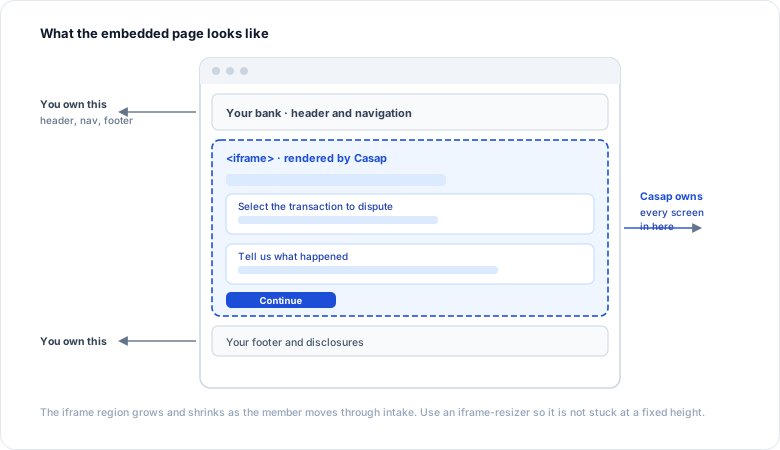
The pages change height as the member moves through intake. Without help, the iframe keeps its original height and the content scrolls inside a fixed box, which reads badly on a phone.
Casap's pages already run the child half of iframe-resizer (v4), which measures the document and posts its height to the parent. You add the matching host script on the embedding page:
<iframe
  id="casap-disputes"
  src="https://<casap-iframe-host>/dispute-landing-<slug>?code=THE_SSO_CODE"
  style="width: 100%; border: 0;"
  title="Disputes"
></iframe>

<script src="https://cdn.jsdelivr.net/npm/iframe-resizer@4.3.2/js/iframeResizer.min.js"></script>
<script>
  iFrameResize({ checkOrigin: ["https://<casap-iframe-host>"], log: false }, "#casap-disputes");
</script>
Keep the host script on version 4 so the two halves stay protocol-compatible. You can size the frame yourself instead, but then you are parsing the [iFrameSizer] messages by hand, and a version change on either side breaks it silently.
Mobile and webviews
The same responsive pages serve a mobile app's webview. There is no separate mobile build and no separate URL.
Two things differ in a webview:
- The session does not survive a teardown. A webview commonly clears it when the view is destroyed. Re-launching has to pass a fresh
?code=, not rely on the earlier session. - Sizing. A native webview can size itself to the content height its SDK reports, which avoids the resizer entirely. If you would rather not, embed a small HTML shell that runs the host script above.
Framing
If you need framing restricted to your own origins, ask Casap at onboarding. It is not something you can turn on yourself.
The origins you register with us serve a different purpose: they are where the frame sends its completion message, and each must be https.