Authentication: JWT
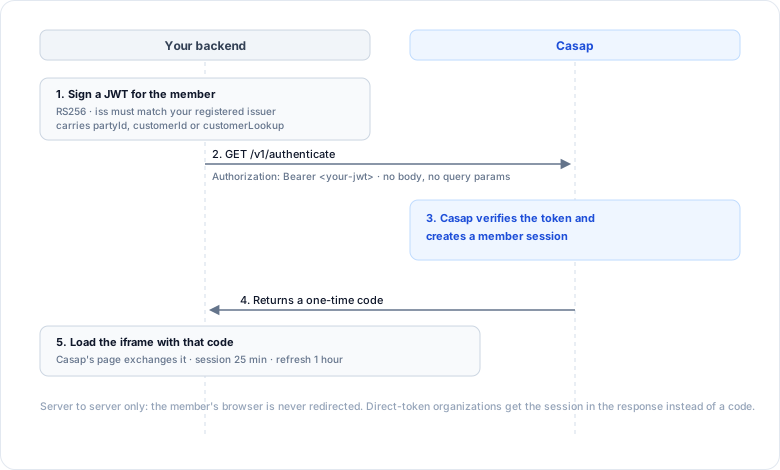
One server-to-server call. Your backend signs a JWT describing the member; we return a session. No browser redirects, no SAML, no OIDC provider.
GET /v1/authenticate
Authorization: Bearer <your-signed-jwt>
There is no request body and no query parameters. Everything travels in the JWT.
This is called by your server, never the member's browser.
Setting it up
Give Casap two things:
- Your issuer string, which must match the
issclaim exactly. - Your public keys, either as an HTTPS JWKS URL or as a key we hold directly.
Sign with RS256. Casap verifies every token against the keys you registered.
Claims
Always required
iss(string) — your registered issuer. It must match exactly; an unrecognised issuer is refused.
Naming the member. Send at least one of these three. A token carrying none of them is rejected.
customerLookup(object) — describes how to find the member in your core. The richest option, and the one to prefer for new integrations.partyId(string) — your member identifier. Must be numeric.customerId(string) — your customer identifier.
Conditional
accountsId(array of strings, or one comma-separated string) — the accounts to scope the session to. Required unless you sendcustomerLookup.accountIdsis accepted as an alias; if you send both,accountsIdis the one read.orgId(string) — only needed when your issuer is registered against more than one organization.
Optional
useCase(string) — which screen the member lands on. See What the iframe shows.intakeRef(string) — theintakeCaseIdfrom Create Intake Case, to open on a transaction you already chose.disputeId(string) — opens one specific dispute. Must be a valid UUID: anything else is silently ignored and the member lands on the list instead.name,email,phone,address(strings) — member details, used to prefill.userCreatedAt(string) — when the member's account was opened, ISO 8601.preselectedAccountId(string) — the account to select first.channel(string) — your app's name, shown in audit history.os(string) — client OS, for troubleshooting.locale(string) — the member's locale.
What comes back
By default you get a one-time code:
{ "code": "9f3a7c55-..." }
Put it on the iframe URL as ?code=. Casap's page turns it into the member's session. The code lasts two minutes and works once.
If your organization is configured for direct tokens, you get the session instead:
{
  "sessionToken": "...",
  "expiresAt": 1790000000,
  "refreshToken": "...",
  "refreshExpiresAt": 1790003600
}
Lifetimes
These are the defaults. Ask Casap if your organization is set up differently.
| Value | Lasts |
|---|---|
| Session token | 25 minutes |
| Refresh token | 1 hour |
| One-time code | 2 minutes |
Errors
| What happened | Status |
|---|---|
No Authorization header, or no Bearer prefix |
401 |
| Bad signature, unknown issuer, or expired token | 401 |
No identifier claim, or a non-numeric partyId |
400 |
| Your organization has no member session configured yet | 404 |
Not the same as the Dispute API key
This endpoint takes a JWT you signed. The Dispute API takes the bearer token Casap issued you. They are different credentials for different jobs: this one mints a member session for the iframe, the other authenticates your server to read and write dispute data. A session token from here will not work on the Dispute API.