Authentication: SAML 2.0
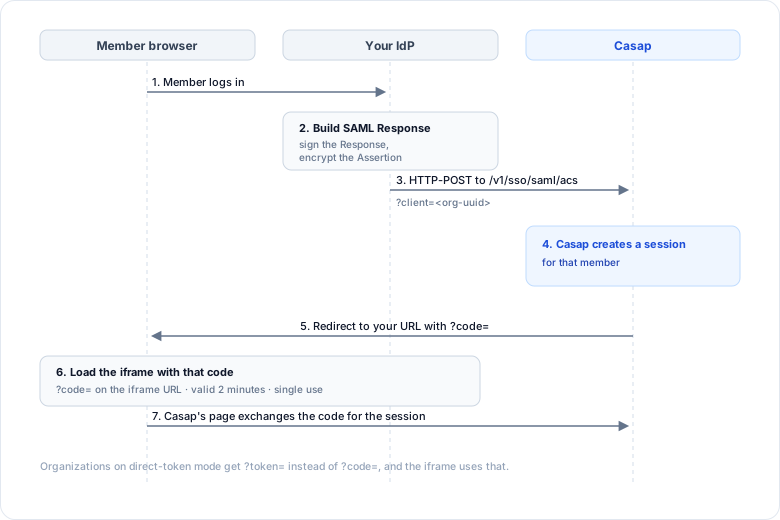
Casap acts as the service provider. Your platform is the identity provider. This is the standard SAML 2.0 Web Browser SSO profile, so any mainstream IdP can do it without custom work.
Endpoints
Both carry a client parameter holding your Casap organization id.
| Purpose | URL |
|---|---|
| ACS (where you POST the response) | https://api-sandbox.casaphq.com/v1/sso/saml/acs?client=<org-uuid> |
| Entity ID / metadata | https://api-sandbox.casaphq.com/v1/sso/saml/metadata?client=<org-uuid> |
Swap api-sandbox for api in production. Binding is HTTP-POST.
What you send
Put the member's details in the AttributeStatement of the assertion.
Required:
User.OrgID— your Casap organization id.User.TaxID— the member's tax id, encrypted.
Optional:
User.Email— email address.User.FirstName,User.LastName— the member's name.User.Phone— contact number.User.Address— full address.User.UseCase— which screen to open on. See What the iframe shows.
Instead of a tax id you can send a PartyID, or a CustomerLookup block if you need to describe how we should find the member. Ask Casap which fits your core.
Do not put personally identifiable information in the Subject. Send an opaque unique identifier there.
Signing and encryption
- Sign the Response with your private key. We verify it against your metadata.
- Encrypt the Assertion with the public certificate Casap gives you. It carries PII, so this is not optional.
- We recommend RSA-OAEP for key transport and AES-128 or AES-256 for the data.
Casap rotates certificates every two years and contacts you ahead of expiry.
What comes back
Once the response validates, Casap creates a session and redirects to the URL you registered with us. Depending on your configuration that carries either a one-time ?code= or a ?token=. See Embedding the iframe for what to do with each.
Casap does not store member credentials. Each login creates a session from what you asserted.